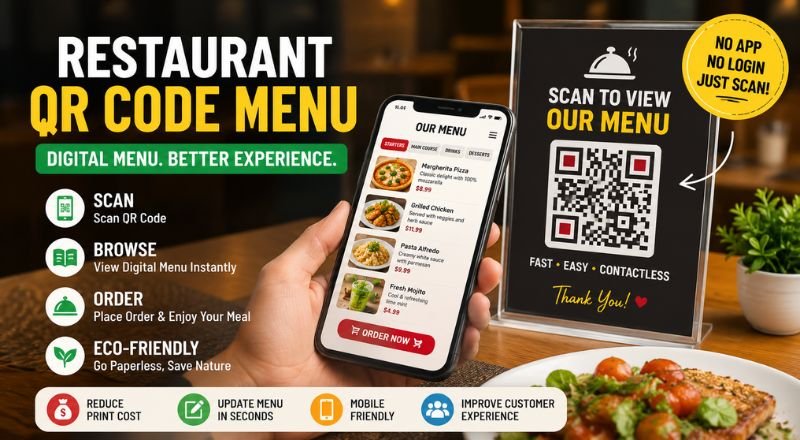
Upgrade your restaurant with a QR code menu. Share digital menus, update prices instantly, reduce printing costs, and improve customer experience.
Restaurant QR Code Menu: The Complete Guide to Digital Menus for Modern Restaurants (2026)
A restaurant QR code menu has become one of the simplest ways to improve customer service while reducing printing costs. Customers scan a QR code with their smartphone, view your menu instantly, and place orders without handling paper menus.
From cafés and food trucks to luxury restaurants, QR code menus have changed how businesses serve customers. They're faster to update, easier to manage, and work on almost every modern smartphone.
What Is a Restaurant QR Code Menu?
A restaurant QR code menu is a digital menu that opens when customers scan a QR code using their phone's camera. Instead of handing out printed menus, restaurants display QR codes on tables, counters, windows, receipts, or posters.
The QR code can link to:
- Digital food menu
- PDF menu
- Restaurant website
- Online ordering page
- Reservation system
- Customer feedback form
Customers simply scan and browse without installing an app.
Why Restaurants Are Switching to QR Code Menus
Paper menus cost money every time prices change.
Digital menus can be updated in minutes.
Restaurants also avoid reprinting hundreds of menus whenever they introduce new dishes, remove seasonal items, or change prices.
Key Benefits
- Lower printing costs
- Instant menu updates
- Contactless dining
- Faster customer service
- Easy smartphone access
- Better menu presentation
- Supports multiple languages
- Eco-friendly alternative to paper menus
How Does a Restaurant QR Menu Work?
The process is simple.
- Create your digital menu.
- Upload it to your website or menu page.
- Generate a QR code.
- Print the QR code.
- Place it on every table.
Customers scan the code and your menu opens immediately.
Best Places to Display QR Codes
Visibility matters.
Restaurants commonly place QR codes on:
- Dining tables
- Entrance doors
- Countertops
- Takeaway packaging
- Business cards
- Flyers
- Window stickers
- Table tents
- Restaurant receipts
Adding a short instruction like "Scan to View Menu" improves scan rates.
QR Code Menu Best Practices
A digital menu should load quickly.
Keep your menu clean, readable, and mobile-friendly.
Use high-quality food images without slowing the page.
Group menu items into categories such as Starters, Main Course, Desserts, Drinks, and Specials.
Include prices, ingredients, dietary labels, and availability where possible.
Static vs Dynamic QR Codes
Static QR codes work well for restaurants with stable menu links.
Dynamic QR codes let you change the destination without replacing the printed QR code. They're useful for restaurants that frequently update menus or seasonal promotions.
Can QR Code Menus Increase Sales?
Yes.
Restaurants often use digital menus to feature popular dishes, chef's specials, combo meals, and limited-time offers. Attractive food photos and clear descriptions encourage customers to order more.
Some restaurants also add direct links for online ordering, reservations, loyalty programs, and customer reviews.
Are QR Code Menus Safe?
QR code menus are safe when they point to a secure HTTPS website.
Always test your QR code before printing. Make sure it opens the correct page and works on both Android and iPhone devices.
Who Should Use Restaurant QR Code Menus?
They're a good fit for:
- Restaurants
- Cafés
- Coffee shops
- Hotels
- Bars
- Bakeries
- Food trucks
- Fast-food chains
- Cloud kitchens
- Catering businesses
Any business serving food can simplify menu access with a QR code.
Frequently Asked Questions
Is a restaurant QR code menu free?
Yes. Many QR code generators let you create static QR codes for free.
Do customers need an app?
No. Most modern smartphones scan QR codes directly from the camera.
Can I update my menu later?
Yes. If you use a dynamic QR code or keep the same menu URL, updates appear without printing a new QR code.
Will QR codes work on iPhone and Android?
Yes. Both platforms support QR code scanning.
Can I add online ordering?
Yes. Your QR code can open an ordering page, reservation system, or payment platform.
Conclusion
A restaurant QR code menu saves time, reduces printing costs, and gives customers instant access to your latest menu. Whether you run a small café or a multi-location restaurant, a QR menu keeps your menu current and your dining experience smoother.