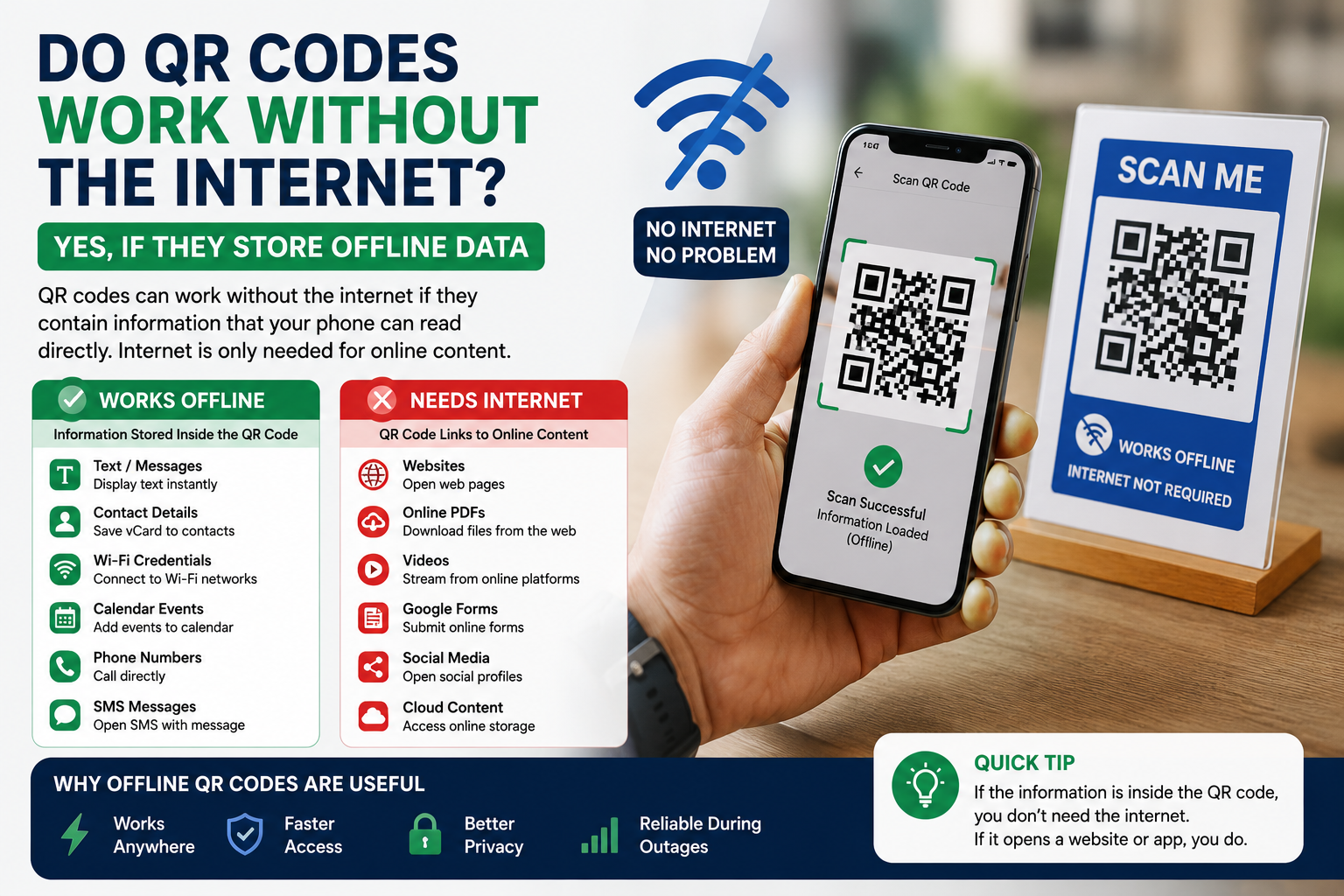
A lot of people think every QR code needs an internet connection. It doesn't. Whether a QR code works offline depends on what it stores. Some QR codes contain information your phone can read instantly. Others point to online content, which means your device needs internet access before it can open anything.
If you've ever wondered why one QR code works on an airplane while another refuses to load in a parking garage, here's the reason.
The short answer
Yes.
A QR code works without the internet if it stores offline data such as text, contact information, calendar events, or Wi-Fi credentials.
If the QR code opens a website, video, cloud document, or online form, you'll need an internet connection to reach that destination.
The QR code itself still scans. Your phone simply can't reach the online content.
How a QR code stores information
A QR code is a square pattern made of black and white modules.
Inside that pattern is data.
When you scan it, your phone reads the data and decides what action to take.
Sometimes the information is already inside the QR code.
Sometimes the QR code only contains a web address.
That difference decides whether the internet is required.
QR codes that work offline
Many QR codes continue working anywhere because all the information is stored directly inside the code.
Plain text
A text QR code works without internet.
Scan it and the message appears immediately.
People use these for instructions, passwords, emergency information, and equipment labels.
Contact information
A vCard QR code stores contact details.
You can save a person's:
- Name
- Phone number
- Email address
- Company
- Job title
- Website
The contact appears on your phone even if mobile data is turned off.
Wi-Fi credentials
A Wi-Fi QR code contains:
- Network name
- Password
- Security type
Your phone reads the information and asks if you'd like to connect.
The QR code works offline because it already contains the network details.
Of course, connecting to the Wi-Fi network requires the router to be available.
Calendar events
A calendar QR code stores event information.
After scanning, your phone can create an event with:
- Title
- Date
- Time
- Location
- Notes
No internet is needed for that step.
Phone numbers
Some QR codes simply contain a phone number.
Your phone opens the dialer with the number already entered.
You decide whether to place the call.
SMS messages
An SMS QR code prepares a text message.
It can include both the phone number and the message.
Once you tap Send, your phone uses the mobile network as usual.
QR codes that need internet
Some QR codes only store a destination.
Your phone reaches that destination through the internet.
Website URLs
This is the most common example.
The QR code contains a web address.
After scanning, your browser opens that page.
Without internet, the browser can't load the website.
Google Forms
Many schools and businesses print QR codes for surveys.
The QR code opens a Google Form.
Without internet, the form can't appear.
PDF files stored online
A QR code can link to a PDF stored on a website or cloud service.
The file downloads only after your phone connects to the internet.
Videos
A YouTube QR code works the same way.
The QR code scans successfully.
The video still needs an internet connection.
Social media profiles
QR codes linking to Instagram, Facebook, LinkedIn, TikTok, or X require internet access because those profiles live online.
Why does my QR code scan but nothing opens?
This usually happens for one of four reasons.
No internet connection
Your phone recognizes the QR code.
It simply can't load the website.
The website no longer exists
The QR code works.
The destination doesn't.
Broken links create this problem.
Weak mobile signal
A slow connection can delay loading.
Sometimes waiting a few seconds solves the problem.
The QR code is damaged
A torn label or blurry print can stop successful scanning.
Printing high-quality QR codes reduces this risk.
How to check whether your QR code works offline
Testing takes less than a minute.
Turn on Airplane Mode.
Disconnect from Wi-Fi.
Now scan your QR code.
If the stored information appears immediately, it works offline.
If your browser reports that it can't reach the page, the QR code depends on the internet.
It's an easy test before printing hundreds of labels or brochures.
Real examples
Here are a few everyday situations.
Museum exhibits
A museum prints QR codes beside artwork.
If each QR code contains a short description, visitors can read it without internet.
If the QR code links to an online audio guide, visitors need a connection.
Business cards
A business card with a contact QR code works offline.
A business card linking to a company website needs internet.
Restaurants
A QR code opening an online menu requires internet.
A QR code containing today's menu as plain text works offline.
Most restaurants choose online menus because they're easier to update.
Factories
Manufacturers often place QR codes on machines.
Those codes may contain maintenance instructions stored directly inside the QR code.
Technicians can scan them even in buildings without reliable internet.
Static and dynamic QR codes
People sometimes confuse offline use with static and dynamic QR codes.
They're different ideas.
A static QR code can work offline if it stores offline information.
A dynamic QR code usually redirects through an online service, so it normally needs internet access.
What matters most is the data inside the QR code.
Benefits of offline QR codes
Offline QR codes have several advantages.
They work almost anywhere
Airplanes.
Basements.
Warehouses.
Remote construction sites.
If the information is stored inside the QR code, your phone reads it immediately.
Faster access
There's no waiting for a webpage to load.
The information appears almost instantly.
Better privacy
Offline QR codes don't send data to websites during scanning.
That's useful for personal information, internal company processes, or emergency instructions.
Reliable during outages
If the internet goes down, offline QR codes continue working.
Businesses that depend on constant access often use them for backup information.
Limitations of offline QR codes
Offline QR codes also have limits.
The amount of data is smaller than what you can store on a website.
Updating information often requires creating a new QR code.
For information that changes regularly, linking to a webpage usually makes more sense.
Which type should you choose?
Choose an offline QR code when:
- The information rarely changes.
- Internet access isn't guaranteed.
- Fast access matters.
- Privacy is important.
Choose an online QR code when:
- The content changes regularly.
- You need videos or downloadable files.
- You want website analytics.
- The information is too large to fit inside the QR code.
Frequently asked questions
Can a QR code store information without internet?
Yes. QR codes can store text, contact details, calendar events, Wi-Fi credentials, and other offline data.
Does scanning a QR code always use mobile data?
No. Mobile data is only needed when the QR code opens online content.
Can I create an offline QR code for free?
Yes. Most QR code generators let you create offline QR codes without paying.
Can a QR code open a PDF without internet?
Yes, if the PDF is already saved on the device. If the QR code links to a PDF stored online, an internet connection is required.
Does a Wi-Fi QR code need internet?
The QR code itself doesn't. It stores the network name and password. Internet access depends on whether the Wi-Fi network has an active internet connection.
Final thoughts
QR codes don't automatically depend on the internet.
The deciding factor is the information inside the code. If that information lives inside the QR code itself, your phone can read it almost anywhere. If the code points to a website or online service, your device needs internet to reach the destination.
Knowing the difference helps you choose the right QR code before you print labels, business cards, product packaging, or marketing materials.