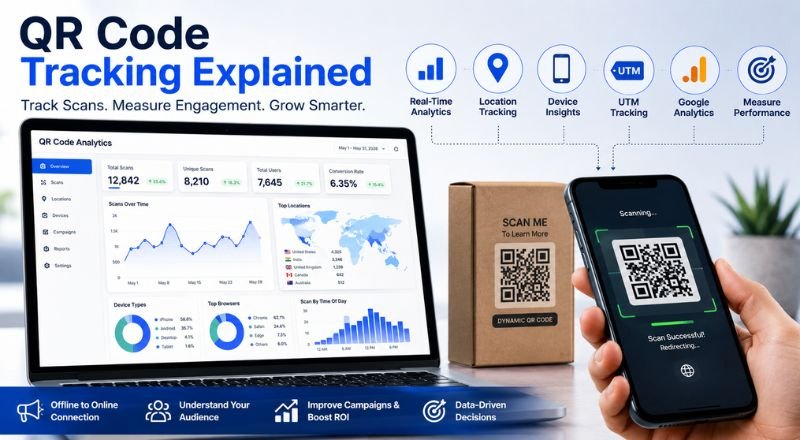
Learn how QR code tracking works, what data you can collect, and how to measure campaign performance using dynamic QR codes, UTM parameters, and Google Analytics.
QR Code Tracking Explained
QR codes have become one of the easiest ways to connect the offline and online worlds. You'll find them on restaurant menus, product packaging, business cards, event tickets, billboards, magazines, and even TV commercials.
But here's the question many businesses ask:
How do you know whether people actually scan your QR code?
That's where QR code tracking comes in.
Instead of guessing whether your printed marketing campaign worked, you can see exactly how many people scanned your QR code, when they scanned it, where they were located, what device they used, and whether they completed your desired action.
Whether you're a small business owner, marketer, educator, restaurant owner, or eCommerce brand, tracking QR codes helps you understand what works and what needs improvement.
In this guide, you'll learn everything about QR code tracking, how it works, the difference between static and dynamic QR codes, and why businesses rely on analytics to improve their marketing campaigns.
What is QR Code Tracking?
QR code tracking is the process of collecting information every time someone scans a QR code.
Rather than sending visitors directly to a webpage, a trackable QR code first records the scan through a tracking server. After that, it redirects the user to the final destination.
This extra step happens in milliseconds, so users never notice it.
Because of this redirect, businesses can collect valuable analytics without affecting the user experience.
Common tracking data includes:
- Number of scans
- Date and time
- User location
- Device type
- Operating system
- Browser
- Campaign source
- Returning vs new visitors
- Landing page performance
This information helps businesses understand how people interact with their QR code campaigns.
Why QR Code Tracking Matters
Imagine printing 20,000 flyers with a QR code.
Without tracking, you only know the flyers were distributed.
You have no idea whether anyone scanned them.
With QR code tracking, you can answer questions like:
- Which city generated the most scans?
- Which day had the highest engagement?
- Did Android users scan more than iPhone users?
- Which poster location performed best?
- Did visitors complete a purchase after scanning?
Instead of relying on assumptions, you make decisions based on real data.
How QR Code Tracking Works
The tracking process is surprisingly simple.
Step 1
A user scans the QR code using their smartphone camera.
↓
Step 2
The QR code points to a tracking URL instead of the final website.
↓
Step 3
The tracking server records information such as:
- Scan time
- Device
- Browser
- Approximate location
- Referral details
↓
Step 4
The user is automatically redirected to the destination website.
↓
Step 5
The scan appears inside your analytics dashboard.
The entire process usually takes less than one second.
What Information Can Be Tracked?
Most professional QR code generators provide detailed analytics.
Here are the most common metrics.
Total Scans
This tells you how many times your QR code has been scanned.
Example:
- Monday: 120 scans
- Tuesday: 185 scans
- Wednesday: 310 scans
You can quickly identify which marketing activities increase engagement.
Unique Scans
One person might scan the same QR code several times.
Unique scans estimate how many individual users interacted with your campaign.
Example:
- Total scans: 2,500
- Unique users: 1,900
This gives a more accurate picture of audience reach.
Scan Location
Most platforms estimate the scanner's location using their IP address.
You'll often see:
- Country
- State
- City
Example:
Country
Scans
India
4,800
United States
2,900
United Kingdom
850
Canada
640
If your campaign targets specific regions, this data becomes extremely useful.
Device Information
Analytics usually include:
- Android
- iPhone
- Windows
- Mac
- Tablet
Knowing which devices dominate helps you optimize landing pages.
Scan Time
Every scan is timestamped.
You may discover patterns like:
- Highest activity at lunchtime
- Weekend spikes
- Evening engagement
Businesses often use this data to schedule promotions more effectively.
Browser Details
Many tracking systems identify browsers such as:
- Chrome
- Safari
- Firefox
- Edge
Although this isn't the most important metric, it can help troubleshoot compatibility issues.
Static QR Codes vs Dynamic QR Codes
Many beginners assume all QR codes work the same way.
They don't.
The biggest difference is whether the destination can be changed after printing.
Feature
Static QR Code
Dynamic QR Code
Editable URL
❌ No
✅ Yes
Scan Analytics
❌ No
✅ Yes
Campaign Tracking
❌ No
✅ Yes
Change Destination
❌ No
✅ Yes
Marketing Reports
❌ No
✅ Yes
Best for Business
❌ Limited
✅ Excellent
For serious marketing campaigns, dynamic QR codes are the better choice because they provide analytics and flexibility.
Why Static QR Codes Cannot Be Tracked
A static QR code stores the final destination directly inside the code.
For example:
https://yourwebsite.com/product
When someone scans it, their phone opens that page immediately.
There is no tracking server involved.
As a result:
- No scan reports
- No location data
- No device information
- No campaign analytics
If you need performance insights, choose a dynamic QR code.
How Dynamic QR Codes Enable Tracking
Dynamic QR codes work differently.
Instead of embedding the final destination, they contain a short redirect URL.
For example:
https://qr.yourdomain.com/a8Kd91
When scanned, the request passes through the tracking server first.
That server records information such as:
- Scan time
- Device type
- Approximate location
- Browser
- Campaign details
Then it instantly redirects the user to the intended webpage.
Because the destination URL lives on the server, you can update it anytime without changing the printed QR code.
This is especially useful for long-term marketing materials like brochures, posters, product packaging, and business cards.
Real-World Example
A coffee shop prints a QR code on 5,000 takeaway cups.
The QR code links to a page offering a free drink after five purchases.
After one month, the analytics show:
- 3,200 total scans
- 2,450 unique users
- Most scans happened between 8:00 AM and 10:00 AM
- 78% of users scanned with an iPhone
- 62% of scans came from customers within 5 km of the shop
Based on this data, the shop owner decides to launch breakfast-only promotions and place additional QR codes near nearby office buildings.
Without tracking, these insights would be impossible.
Benefits of QR Code Tracking
Tracking turns a simple QR code into a measurable marketing tool.
Some of the biggest advantages include:
- Measure campaign performance with real data.
- Compare different advertising channels.
- Identify your highest-performing locations.
- Understand customer behavior.
- Improve future marketing campaigns.
- Reduce wasted advertising spend.
- Test different landing pages.
- Calculate return on investment (ROI).
- Monitor campaign performance in real time.
- Make smarter business decisions backed by analytics.
For businesses investing in print advertising, events, packaging, or outdoor promotions, these insights can make a significant difference.